

PTE Result Check Online 2026: How to Check Your PTE Result Step-by-Step

TL;DR
- This blog targets PTE test takers, study abroad aspirants, and visa applicants who are searching for PTE result check online, including queries like how to check PTE result, PTE result login, and PTE score download. It provides a complete step-by-step guide from result checking to score sharing, helping users avoid confusion and delays.
- The blog explains the official method to check PTE results through the Pearson myPTE portal. Users can log in, navigate to “My Activity,” click “View Score,” and download their score report. It ensures clarity for users searching how to check PTE result online and eliminates dependency on unofficial sources.
- It clearly explains why results may not appear immediately, including “We are scoring your test” status, system validation, identity checks, and peak processing delays. It also highlights the standard timeline of 24–48 hours and rare delays up to 5 business days, helping users reduce anxiety.
- The blog provides practical solutions for common issues like login failure, wrong account selection, email not received, and page loading errors. This makes it more valuable than competitors by offering actionable fixes for users facing problems during PTE result check.
- It explains how to send PTE scores to universities using Score Report Code (SRC), direct Pearson sharing, and institutional tracking. It also covers score validity (2 years), score range (10–90), and global acceptance, making it a complete post-result guide beyond just checking scores.
Related Blogs
- PTE Score Calculator 2026 – Check Your Overall & Module Scores
- PTE Score Chart 2026: Latest PTE Score Table
- Superior PTE Score for Australia PR: Required Scores, Points
Introduction
If you are searching for PTE result check online, you are likely in the most stressful phase of your exam journey, waiting for your score after completing the test. Many test takers feel anxious because they do not know exactly when or how their results will appear, or they are unsure about the correct login process to access their score.
After finishing the PTE Academic exam, it is completely normal to repeatedly check emails or try logging into different portals expecting instant results. However, the process is fully automated and can take some time, which often leads to confusion, unnecessary worry, or even checking the wrong websites.
The official and only reliable method to check your PTE result is through your Pearson myPTE account, where your score report is securely published. Typically, PTE results are available within 24 to 48 hours after your test, although in some cases it may take slightly longer due to additional scoring checks or verification processes.
To avoid misinformation and delays in understanding your result, it is important to always rely on the official platform.
PTE results are released online only through the official Pearson portal, and no third-party website or unofficial source can provide authentic score reports.
How to Check PTE Result Online?
If you are looking for check PTE result online or trying to complete your PTE result check, the entire process is done through your official Pearson myPTE account. Once your test is fully scored, your result is automatically uploaded to your dashboard, where you can view and download it anytime.
To check your PTE result online, follow these simple steps:
- Log in to your official myPTE account using your registered email and password
- Go to the “My Activity” section on your dashboard
- Locate your completed test and click on “View Score”
- Open your PTE score report and download the PDF file for future use
You can check your PTE result online by logging into your myPTE account, navigating to “My Activity,” and downloading your score report, usually available within 24–48 hours after the test.
How to Check PTE Result Step-by-Step Process ?
If you want to complete your PTE result check online correctly, it is important to follow the official process through your Pearson myPTE account. Many students miss their result or face delays simply because they skip steps or log in incorrectly. Below is the complete step-by-step guide to help you access your PTE score report without confusion.
Step 1 – Check your registered email
Start by checking the email address you used during your PTE registration.
- Look for an official email from Pearson PTE notifying that your score is available
- Carefully check your spam, junk, or promotions folder, as emails may be filtered there
- In some cases, email delivery may be slightly delayed even though the result is already available in your account
Important: Even if you do not receive an email, your PTE result may still be available in your myPTE account, so always check the portal directly.
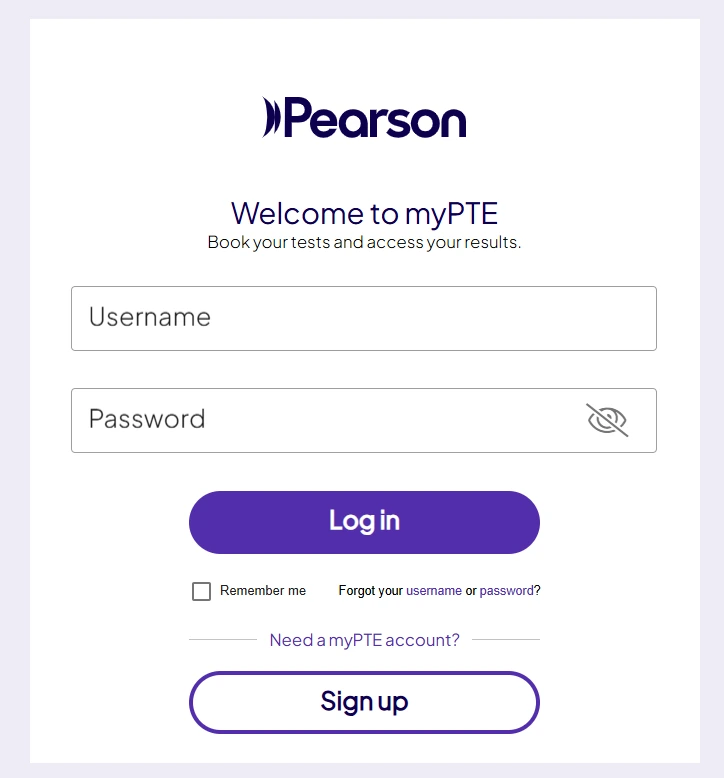
Step 2 – Log in to myPTE account
Next, log in to the official Pearson myPTE portal using your registered credentials.
- Always use the official login page to avoid incorrect or fake portals
- Make sure you are using the same email ID used during test registration
- A common issue is creating or using multiple accounts, which can lead to missing results
- If you cannot log in, the issue is usually related to wrong email or password mismatch
Step 3 – Go to “My Activity”
After logging in, navigate to the “My Activity” section on your dashboard.
- This section contains all your past and recent test records
- Your completed PTE exam will be listed here once the result is released
- Many users mistakenly check the homepage instead of “My Activity,” which leads to confusion
- Always open “My Activity” to track your PTE result status
Step 4 – Click “View Score”
Once your result is available, you will see the “View Score” option next to your test.
- Clicking this will load your official PTE score report
- The system may take a few seconds to generate your result page
- Your score breakdown (Listening, Reading, Writing, Speaking) will be displayed in detail
- This is your official result, approved by Pearson
Step 5 – Download your PTE score report
After viewing your result, download your official score report for future use.
- The PTE score report PDF includes your overall score and section-wise performance
- You can use this report for university applications, visa processing, and immigration purposes
- Save a copy on your device and also keep a backup for future reference
- You can also directly share your score with institutions through your myPTE account
Why Your PTE Result is Not Showing?
If your PTE result check online is not showing your score immediately, it does not always mean there is an issue. In most cases, delays are part of the normal result processing cycle in Pearson’s system. Understanding the reason behind this can help reduce unnecessary stress after your exam.
We are scoring your test” meaning
When you see the status “We are scoring your test”, it simply means your exam is still under evaluation.
- This is a normal processing stage after your test is completed
- Your responses are being checked and finalized by Pearson’s scoring system
- In some cases, human verification or additional quality checks may also be performed before releasing the final score
Common reasons for PTE result delay
Several factors can delay your PTE result check online, even if the exam is completed successfully:
- System validation checks to ensure score accuracy and fairness
- Weekend or public holiday processing delays at Pearson test centers
- Additional identity verification if any security checks are required
- Technical review process for unusual test patterns or system flags
Expected PTE result timeline
Understanding the official timeline helps manage expectations after your test:
- Normal delivery time: 24–48 hours after the exam
- In most cases, results are released within this window without any delay
- Extended timeline: up to 5 business days (rare cases only) when additional checks are required
PTE Result Check Issues and Solutions
If you are trying to complete your PTE result check online and facing issues while accessing your score, it is usually due to login errors, account mismatch, or normal result processing delays. Below are the most common problems students face while checking their PTE result along with simple solutions.
Common PTE Result Issues and Solutions
| Problem | Solution |
| Cannot log in | Reset your password or verify your registered email address |
| Wrong account | Make sure you are using the same email ID used during PTE registration |
| Result not showing | Wait for 48–72 hours as results may still be under processing |
| Email not received | Check your spam, junk, or promotions folder for Pearson notifications |
| Page not loading | Try using a different browser or device and clear cache |
How to Share PTE Result with Universities
After completing your PTE result check online and downloading your score report, the next step is sharing your PTE score report with universities, colleges, or immigration bodies. Pearson has made this process fully digital, meaning your scores can be sent securely without any manual paperwork or email submissions.
Use Score Report Code (SRC)
Every official PTE score report comes with a unique Score Report Code (SRC) that acts as a digital verification key.
- The SRC is generated automatically for every test taker after result release
- Universities and institutions can use this code to instantly verify your official PTE result
- It ensures authenticity and removes the risk of fake or altered score reports
- This is one of the most widely accepted methods for verifying PTE score reports globally
Direct electronic sharing via Pearson
The most reliable way to send your PTE score report is through Pearson’s official system inside your myPTE account.
- Log in to your myPTE account after your PTE result is available
- Select the option to send your score electronically
- Search and choose the required university or institution
- Pearson securely transmits your result directly to the selected organization
This ensures your PTE result check online is not only for viewing but also for official score submission.
No need to send PDF manually
Unlike traditional exam systems, PTE does not require you to upload or email your score report PDF.
- Universities receive your score directly from Pearson’s verified database
- This eliminates delays caused by document verification or manual handling
- It also reduces the risk of rejection due to incorrect or unofficial submissions
- Your PTE score report PDF is mainly for personal reference only
Add institutions directly in myPTE account
You can manage and track all score submissions from a single dashboard.
- Log in to your myPTE account and navigate to the score sharing section
- Add multiple universities or institutions directly to your profile
- Send your PTE score report to several destinations in one go
- Track where your results have been sent and confirmed within your account
PTE Score Validity & Meaning
After completing your PTE result check online, it is important to understand how long your score remains valid and what it represents. Your PTE score report is not only used for admissions but also plays a key role in visa and immigration applications.
Valid for 2 years
Your PTE Academic score is valid for a limited period.
- The PTE score report is valid for 2 years from the date of your test
- After this period, the score expires and cannot be used for applications
- You will need to retake the exam if a valid score is required again
Accepted by universities & immigration bodies
The PTE result is widely recognized globally.
- Accepted by thousands of universities worldwide for admissions
- Approved by immigration authorities for visa applications (including study and work visas)
- Trusted as a fully computer-based English proficiency test with secure scoring
Score range: 10–90 scale
The PTE score report is based on a standardized scoring system.
- Overall score ranges from 10 to 90
- Includes section-wise scores: Speaking, Writing, Reading, and Listening
- Higher scores indicate stronger English proficiency levels
- Universities and visa authorities set their own minimum score requirements based on program needs
Frequently Asked Questions
How long does PTE result take?
The PTE result is usually released within 24–48 hours after completing the test. However, in some rare situations, it may take longer if additional identity verification or quality checks are required before final score approval.
Can I check PTE result without email?
Yes, you can still complete your PTE result check online even if you have not received an email notification. The result is always available directly through your myPTE account, so logging into the official portal is the most reliable way to access your score.
What if I forgot my PTE login details?
If you forget your login details, you can recover access through the official Pearson portal. Simply use the “Forgot Password” option and reset your credentials using your registered email address. It is important to use the same email ID that was used during your PTE registration to avoid account mismatch issues.
Is PTE result available on mobile?
Yes, the PTE result check online process can be done on mobile devices as well. You only need to open the official myPTE website in your mobile browser, log in with your credentials, and view or download your score report. No separate mobile application is required.
Why is my PTE result delayed?
In some cases, the PTE result may be delayed due to additional verification checks, system validation processes, high exam volume during peak periods, or weekend and public holiday processing delays. These delays are usually temporary, and most results are released within the standard 24–48 hour timeframe.